12 dezembro 2024

Spring Boot 3.4.0 available now

 What's new in 3.4

The highlights of the 3.4 release include:

  • Structured logging
  • Support for defining additional beans of the same type as those that are auto-configured
  • Expanded virtual thread support
  • Improved support for Docker Compose and Testcontainers
  • Numerous Actuator enhancements, including info and health information for SSL certificates
  • Improved image building capabilities, including out-of-the-box support for ARM
  • Auto-configuration for MockMvcTester, an AssertJ-based alternative to MockMvc

Getting Started with Python in VS Code

About
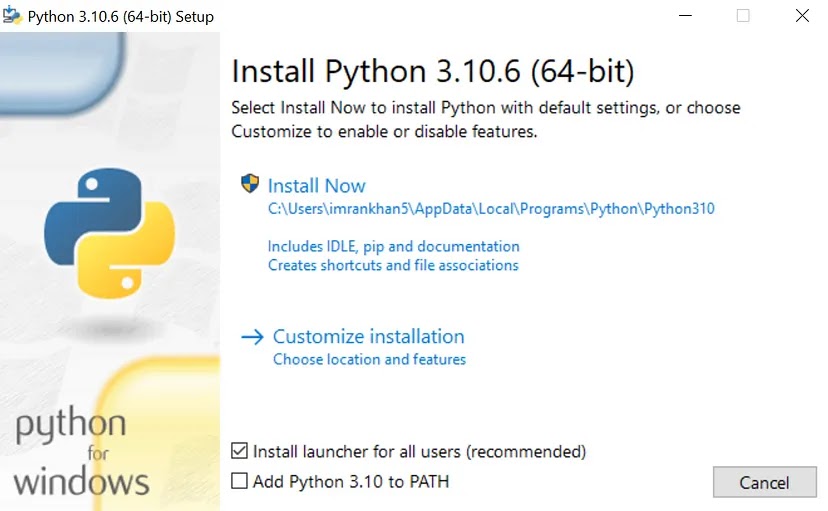
In the “Getting Started with Python in VS Code” video, with ‪@ReynaldAdolphe‬ , viewers learn how to efficiently set up Python development environments in Visual Studio Code, including installing necessary extensions like Python and Pylance. The video demonstrates configuring Python interpreters, managing dependencies, and writing simple Python scripts.


27 agosto 2024

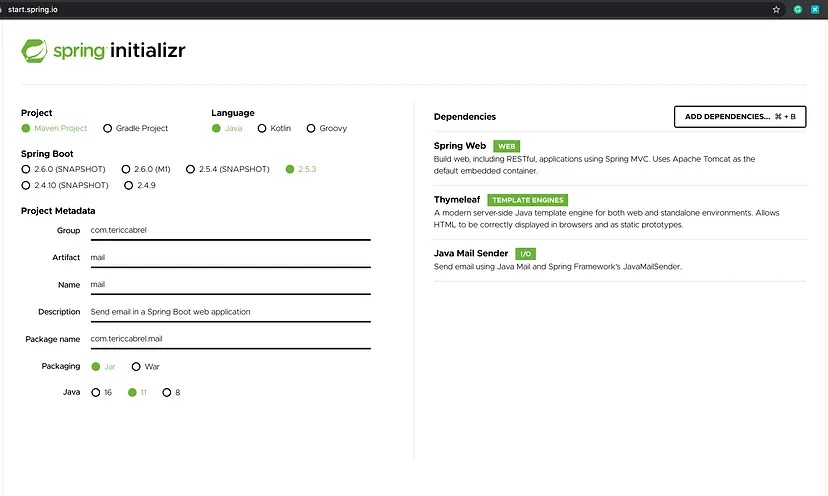
Sending Email Notifications with RabbitMQ Using Java (Spring Boot)


In this tutorial, you will learn the following
  • What is async programming?
  • How to Setting up rabbitmq using docker
  • Connect it with Spring boot application
  • Send email notification asynchronously


29 maio 2024

Building a Generative AI Application with Spring AI


@Service
public class SpringAIService {

    @Autowired
    AiClient aiClient;

    @Value("${spring.ai.openai.apikey}")
    private String apiKey;

    @Value("${spring.ai.openai.imageUrl}")
    private String openAIImageUrl;


    public String getJoke(String topic){
        PromptTemplate promptTemplate = new PromptTemplate("""
                Crafting a compilation of programming jokes for my website. Would you like me to create a joke about {topic}?
                """);
        promptTemplate.add("topic", topic);
        return this.aiClient.generate(promptTemplate.create()).getGeneration().getText();
    }

    public String getBook(String category, String year) {
        PromptTemplate promptTemplate = new PromptTemplate("""
                I would like to research some books. Please give me a book about {category} in {year} to get started?
                But pick the best best you can think of. I'm a book critic. Ratings are great help.
                And who wrote it? And who help it? Can you give me a short plot summary and also it's name?
                But don't give me too much information. I don't want any spoilers.
                And please give me these details in the following JSON format: category, year, bookName, author, review, smallSummary.
                """);
        Map.of("category", category, "year", year).forEach(promptTemplate::add);
        AiResponse generate = this.aiClient.generate(promptTemplate.create());
        return generate.getGeneration().getText();
    }


    public InputStreamResource getImage(@RequestParam(name = "topic") String topic) throws URISyntaxException {
        PromptTemplate promptTemplate = new PromptTemplate("""
                 I am really bored from online memes. Can you create me a prompt about {topic}.
                 Elevate the given topic. Make it sophisticated.
                 Make a resolution of 256x256, but ensure that it is presented in json.
                 I want only one image creation. Give me as JSON format: prompt, n, size.
                """);
        promptTemplate.add("topic", topic);
        String imagePrompt = this.aiClient.generate(promptTemplate.create()).getGeneration().getText();

        RestTemplate restTemplate = new RestTemplate();
        HttpHeaders headers = new HttpHeaders();
        headers.add("Authorization", "Bearer " + apiKey);
        headers.add("Content-Type", "application/json");
        HttpEntity httpEntity = new HttpEntity<>(imagePrompt,headers);

        String imageUrl = restTemplate.exchange(openAIImageUrl, HttpMethod.POST, httpEntity, GeneratedImage.class)
                .getBody().getData().get(0).getUrl();
        byte[] imageBytes = restTemplate.getForObject(new URI(imageUrl), byte[].class);
        assert imageBytes != null;
        return new InputStreamResource(new java.io.ByteArrayInputStream(imageBytes));
    }
}


@RestController
@RequestMapping("/api/v1")
public class SpringAIController {
@Autowired
SpringAIService aiService;
@GetMapping("/joke")
public String getJoke(@RequestParam String topic) {
return aiService.getJoke(topic);
}
@GetMapping("/book")
public String getBook(@RequestParam(name = "category") String category, @RequestParam(name = "year") String year) {
return aiService.getBook(category, year);
}
@GetMapping(value = "/image", produces = "image/jpeg")
public ResponseEntity getImage(@RequestParam(name = "topic") String topic) throws URISyntaxException {
return ResponseEntity.ok().body(aiService.getImage(topic));
}
}


11 abril 2024

04 abril 2024

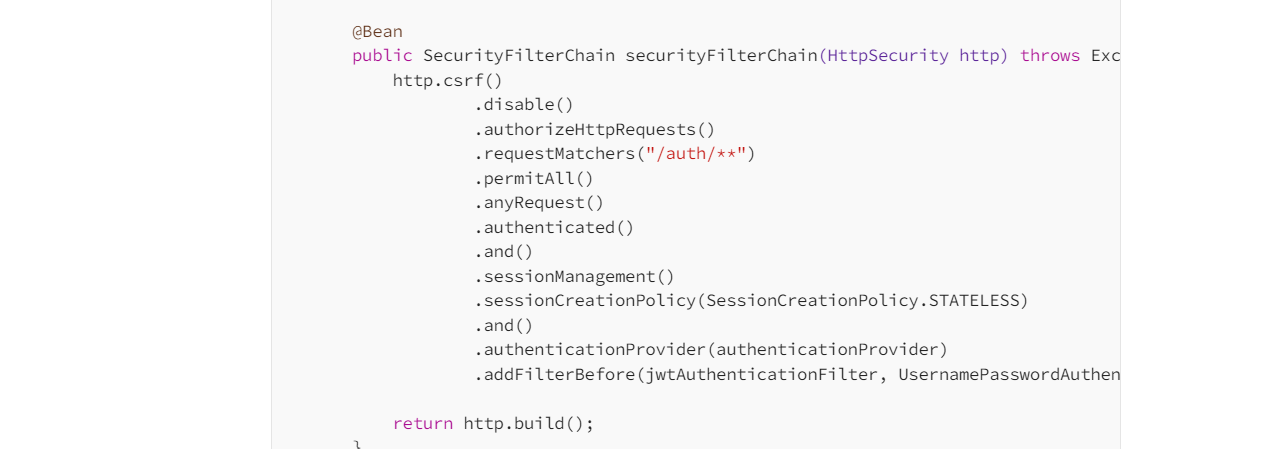
Implement JWT authentication in a Spring Boot 3 application


Prerequisites

  • JDK 11 or higher 
  • Maven 3.8 or higher 
  • MySQL running on Docker 
  • An HTTP client such as Postman, Insomnia, cURL, etc.


20 novembro 2023

ChatGPT Integration with Spring Boot Application


OpenAI ChatGPT APIs
API (POST https://api.openai.com/v1/chat/completions) to generate responses to a prompt. 

What we need to send to invoke the OpenAI API?
  • Upon accessing the “Create Chat Completion” API link, the following information regarding endpoint, request, and response is visible.
  • Endpoint: POST https://api.openai.com/v1/chat/completions
  • Go to Playgroud and type any message e.g. “What is spring boot?”


https://platform.openai.com/api-keys


22 maio 2023

CompletableFuture and ExecutorService

CompletableFuture and ExecutorService 

ExecutorService
public static void main(String[] args) throws ExecutionException, InterruptedException {
        ExecutorService executor = Executors.newFixedThreadPool(3);
        Future futureResult = executor.submit(new Add(10, 20)); // 1
        Integer intermediateResult = futureResult.get(); // 2
        Future finalResult = executor.submit(new Multiply(intermediateResult)); // 3
        System.out.println(finalResult.get());
        executor.shutdown();
    }
CompletableFuture

 
public static void main(String[] args) throws ExecutionException, InterruptedException {
    Integer finalResult = CompletableFuture.supplyAsync(() -> add(10, 20))
            .thenApplyAsync(result -> multiply(result))
            .get();
    System.out.println(finalResult);
}
public static Integer add(int a, int b) {
    return a + b;

}
public static Integer multiply(int result) {
    return result * 15;
}


Source: medium.com/@anil.java.story

RabbitMQ, Apache Kafka, and ActiveMQ

RabbitMQ, Apache Kafka, and ActiveMQ


Source: medium.com/


11 abril 2023

Android: Update activity with android:exported

I have this error in my Android Apllication and I found this solution......


I’ve got every activity, service, and receiver setting the android:exported attribute and I’m still seeing the same error

This also happened to me.

If your using external libraries that add any of these components to your Manifest file and they aren’t prepared for this new rule you’ll need to add them individually.


25 março 2023

Android Studio error "Installed Build Tools revision 31.0.0 is corrupted"

 First of all, I faced this issue in Android Studio 4.2.2 and you do not need to downgrade the SDK build tool from 31 to 30 or change compile SDK version.

The main problem is the two files missing in SDK build tool 31 that are:

  1. dx.bat
  2. dx.jar

The solution is that these files are named d8 in the file location so changing their name to dx will solve the error.

The steps are below.

For Windows

  1. go to the location

     "C:\Users\user\AppData\Local\Android\Sdk\build-tools\31.0.0"
    
  2. find a file named d8.bat. This is a Windows batch file.

  3. rename d8.bat to dx.bat.

  4. in the folder lib ("C:\Users\user\AppData\Local\Android\Sdk\build-tools\31.0.0\lib")

  5. rename d8.jar to dx.jar

Remember AppData is a hidden folder. Turn on hidden items to see the AppData folder.

For macOS or Linux

Run the following in the Terminal:

# change below to your Android SDK path
cd ~/Library/Android/sdk/build-tools/31.0.0 \
  && mv d8 dx \
  && cd lib  \
  && mv d8.jar dx.jar

Now run your project.


Source: https://stackoverflow.com/questions/68387270/android-studio-error-installed-build-tools-revision-31-0-0-is-corrupted